|
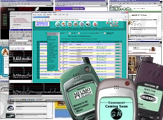
| Performance review at the blink of an eye With the
Server Monitor you can easily monitor the availability and performance of your
webserver(s) and website(s). Have the system monitor and log the performance of
multiple webservers automaticly. Review the performance in detail at the blink
of an eye !
| The Server Monitor - will save you valuable
time
- will help you improve server performance
- will warn you
before and in case of system failure
| The
perfect tool for - Server technicians
- Site and webmasters
- Hosting
Providers
|
| Feature list - Monitor unlimited servers/sites
- System
performance history logs
- Email notification on warning / failure
- Sound
warning on warning / failure
- Customize main overview columns
- Test
any network port (0-65535)
- Custom warning / failure levels
- Refresh
intervals 3 sec to 10 minits
- Includes Google quicksearch
|
Resources monitored - Connectivity
- Uptime
- Online
users *
- CPU Load averages
- CPU states
- Memory usage
- Diskdrive
usage
- MySQL performance *
* These resources do not have noticiation
enabled yet. | Requirements - Linux 2.4.9
- Requires
PHP4+
- Supports Red Hat 8+
- Any web browser
Support
for other Linux kernels is in development. |

| | Main
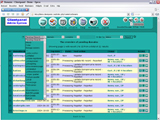
overview The main Overview page shows all selected server url's
and the response values from those servers. The shown data columns can be pre-selected
on the admin page to show only what you want to monitor on the servers.
If any warnings or failures occur on resources that the system monitors then a
warning / failure message and sound will be printed. Warnings and failures are
printed in red colour to bring them to your attention immediatly. Google
quicksearch enables you to quickly browse to related online information. |
| |  | |
Detail view The detail view shows the details of the server.
Included in this view are ; - Hardware specifications (platform)
- Uptime
- Users
online (logged in through shell)
- CPU Load (averages per 1, 5 and 15 minits)
- RAM,
Cache and Swap memory (total, used, free, percentage)
- Services available,
available network ports (FTP, HTTP, POP3, etc..)
| |
|  | | Graphic
performance statistics With the generated statistics you can quickly
view the performance of the specific system resource over a period of days/weeks.
High values (>80%) will be marked with a printed value (blue). The
interval can be set to any time cycle you prefer, per default it is set to 5 minits.
The 'Log-All' page shows all generated statistic graphics on one page. With
a few clicks you can then review the performance of your server over a period
of days/weeks. | | |
 | | Text
performance statistics The text statistics show the exact values
and date/time stamp for the specified resource(s). These logs can be used to pinpoint
the date/time in case of resources failures. | | |
 | | Admin
page The text statistics show the exact values and date/time stamp
for the specified resource(s). These logs can be used to pinpoint the date/time
in case of resources failures. | !Note: We offer no online
demo at the moment. Due to the massive usage of a public demo that server would
quickly find its ports floaded with status requests resulting in a Denial Of Service.
Licenses Licenses for the software are sold one
license per Master Server (*1) which can monitor local resources (eg. Memory, CPU
Load, Diskusage, etc..) and monitor the services (eg. HTTP, POP3, FTP and other
ports) of unlimited servers/sites. For licenses for large networks please
contact our sales staff
for further information. (*2) The Free (limited) version requires no license and is downloadable from the bottom
of this page.
*1) The Master Server
is the one of which you type the url to view the monitor. This server contacts
the other (Slave Servers) and then lists the results. The above screenshots reflect
this type of setup with one Master Server and several Slave Servers.
*2) Each license and system code is binded to the IP number of your Master Server
where the monitor script operates. When your IP changes you can freely download
a updated version for the duration of your license.
Note: Fee's are exclusive VAT. For Dutch residents 19% VAT is charged. For
EU residents with an VAT number VAT is not charged.
Ordering
After receiving your order you will be sent an confirmation message including
the license details and payment information. After receiving payment you will
be sent your account information to obtain your license key and software. The
software will then be available for download, through your admin page, for the
duration of your license period.
The supported payment methods are payment by bank transfer and online credit
card payment. Paypal is also supported ! Your account will be activated within
hours after payment has been processed.
To order your license, click the link below, then complete and submit the
order form.
After submission the order and payment information will be sent to your given
email address.
After receiving of payment your account will be activated for usage and you
will be notified.
To continue ordering click here.
Free download
Get
a feeling of how easy this makes your job as a server operator or webmaster.
Tryout part of this software for free ! No time limit disabling This
version includes : - Service port monitor, monitor standard site ports
FTP, HTTP(S), POP3 and SMTP - Settings.txt file to add more URL's to
monitor
- Audible warning sound
Click here
to download the Free tryout version of the Server Monitor.
| GRATIS
Deze maand is gratis inbegrepen de Payment Gateway module voor online betalingen
via 2Checkout, Paypal, Ogone en iDeal.
|
Uitbreidings kortingen Help ons bij het
uitbreiden van onze taal- en skinsets en verdien een hoge korting. Klik hier
voor meer informatie.
|
| Updates | CP
DRS-NL Ondersteuning voor SIDN DRS5.0 |
| CP
DRS-EURODNS Ondersteuning voor EuroDNS |
| CP
DRS-RRPProxy Ondersteuning voor RRPProxy |
| CP
DRS-NL Ondersteuning voor SIDN DRS4.1 |
| CP
Console Ondersteuning voor DirectAdmin |
| CP
DRS-NL Ondersteuning voor SIDN DRS4.0 |
| CP
SALES Ondersteuning voor bestellingen via eigen
sites | |
|